Chilkat iOS Objective-C / Swift / C / C++ Library Downloads
Install Instructions
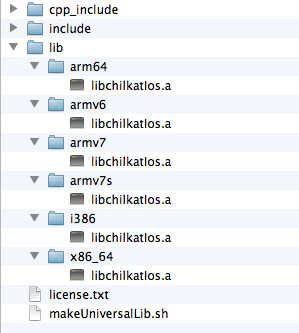
- Download and unzip to any directory. The unzipped directory structure is similar to what is shown here:
- Chilkat provides static libs for each architecture slice: i386, x86_64, armv7, armv7s, arm64.
- The Objective-C headers are contained in the "include" directory.
- The C/C++ class headers are contained in the "cpp_include" directory.
- Building an iOS Universal Chilkat Static Library. A bash shell script (makeUniversalLib.sh) is provided to create a universal static library from the individual slices:
- See these Important Notes for Compiling and Linking iOS Objective-C Programs
- See these Important Notes for Compiling and Linking iOS Swift Programs
- Also see: XCode How to Link with a Static Library
Note:Make sure that Apple's SDK libtool is used because increasingly the PATH environment variable might be such that a different libtool is used by default (from brew, ports, etc)
Important: For iOS 9.0 and watchOS 2.0 and above, do NOT create universal libs that mix simulator and device builds. Instead, create one universal lib for device architectures, and one for simulator architectures. See xcode 7 MakeUniversal lib fails with recommended script
#!/bin/bash -ev
cd lib
/usr/bin/libtool -static i386/libchilkatIos.a
    x86_64/libchilkatIos.a
    armv7s/libchilkatIos.a
    armv7/libchilkatIos.a
    arm64/libchilkatIos.a
    -o libchilkatIos.a
cd ..
You may modify the makeUniversalLib.sh script so that it only includes the slices that are needed.
Your application should then link with the universal libchilkatIos.a that is created by this libtool command.
The downloads on this page are the full-version Chilkat product downloads.
Chilkat libraries are fully functional for 30-day evaluations.
Release Notes
The release notes are available here on the Chilkat blog.
Installing, Linking, etc.
The Chilkat iOS Objective-C libraries are distributed as a .zip archive containing device and simulator libraries (.a) and headers (.h).
IMPORTANT: Installation, Linking, and other notes are posted here: Chilkat iOS Install Notes