Download the Chilkat ActiveX
All of the Chilkat ActiveX objects are contained within a single DLL.
MSI Installers
32-bit Per-Userinstalls toC:\Users\YOUR_WINDOWS_USER\AppData\Roaming\Chilkat Software, Inc\Chilkat 32-bit ActiveX (Per-User)\32-bit Per-Machineinstalls toC:\Program Files (x86)\Chilkat Software, Inc\Chilkat 32-bit ActiveX (Per-Machine)\64-bit Per-Userinstalls toC:\Users\YOUR_WINDOWS_USER\AppData\Roaming\Chilkat Software, Inc\Chilkat 64-bit ActiveX (Per-User)\64-bit Per-Machineinstalls toC:\Program Files\Chilkat Software, Inc\Chilkat 64-bit ActiveX (Per-Machine)\
Using the ActiveX in VB6
VB6 always runs as a 32-bit process. Therefore, you should always download and use the 32-bit ActiveX for VB6, even on 64-bit Windows.
Visit these pages for help on using the Chilkat ActiveX in Visual Basic 6.0
Using the ActiveX in FoxPro
FoxPro and many older programming languages always run as a 32-bit process. Therefore, you should always download and use the 32-bit ActiveX, even on 64-bit Windows.
Using the ActiveX in VBA (Excel, Access, etc.)
See How to Use an External ActiveX Library in VBA with Excel.
Using the ActiveX in Classic ASP or SQL Server
The easiest way to install for use in Classic ASP or SQL Server is with the per-machine MSI Installer. For classic ASP, install on the web server. For use in SQL Server stored procedures, install on the server that runs SQL Server. If you don't know whether your ASP code or SQL Server runs as 32-bit or 64-bit, then install both 32-bit and 64-bit to cover both possibilities.
Using the ActiveX in PHP on Windows
The php_com_dotnet.dll may need to be enabled inside of php.ini. The php_com_dotnet.dll is not a DLL provided by Chilkat, but is a DLL that should already exist with your PHP installation. See Enabling DOTNET COM Extension
Manual Zip Install Instructions
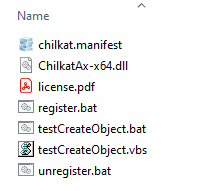
Download and unzip to any directory on the local hard drive. The ActiveX DLL should NOT be located on a non-local filesystem. The unzipped directory structure is shown below.
32-bit ActiveX Unzipped Files 64-bit ActiveX Unzipped Files 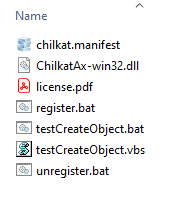
- Question: Do I need the 32-bit ActiveX or the 64-bit?
Answer: The choice does not necessarily depend on whether the Windows system is 64-bit. The choice depends on whether the program using the ActiveX is a 32-bit program or a 64-bit program. For example, all VB6 and Visual FoxPro applications will use the 32-bit ActiveX's, even on 64-bit Windows. - Register the ActiveX DLL using the .bat script provided in the download. The script uses regsvr32 to register the ActiveX.
Manual ActiveX DLL Registration
ActiveX DLLs need to be registered on any computer where they are used. When distributing your application with an ActiveX DLL, your installer will need to register the ActiveX DLL. Most installer packages provide features for automating ActiveX DLL registration.
- To register the Chilkat ActiveX DLL, run the register.bat script from a command prompt.
- See Also: ActiveX DLL Registration Tutorial
30-Day Trial
The downloads on this page are the full-version Chilkat product downloads.
Chilkat components are fully functional for 30-day evaluations.
Release Notes
The release notes are located on the Chilkat blog.